
EDB Run-Walk Challenge 2025
Race Period
10 Nov 2025, 00:00 — 8 Dec 2025, 23:59
Location
Anywhere
Qualifying Criteria
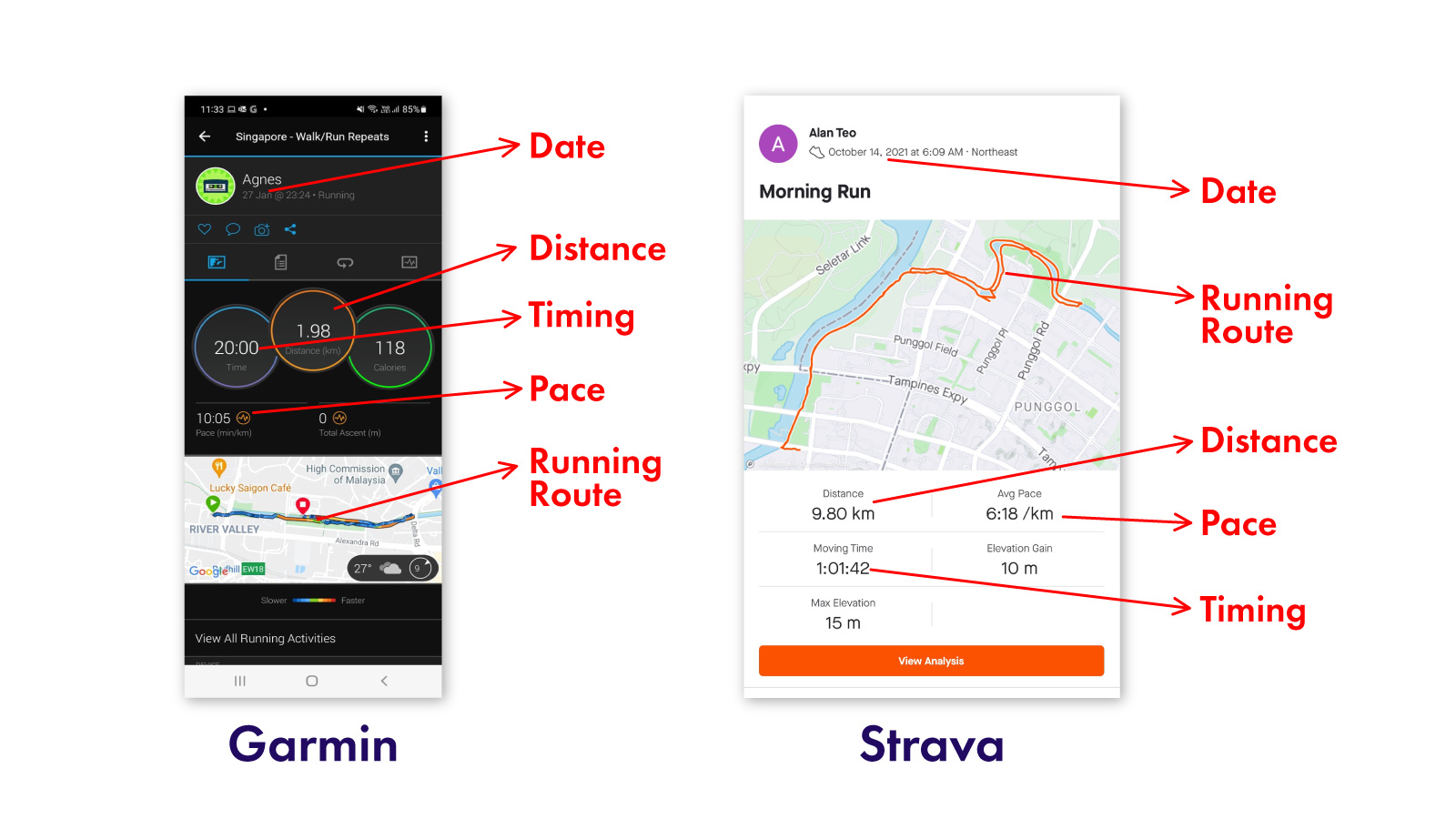
To qualify, please submit a screenshot from the tracking app you used to record your activity. Ensure the screenshot clearly shows both the distance covered and the duration of the activity for it to be accepted.
Mode of Activities
Run / Walk only (Minimum 1 km & Maximum 50km for each walk/run session). Each session is capped at 7 hours.
Treadmill use is allowed. Cycling is NOT allowed.
How Does It Work?
Complete your activity at your own time and pace, anywhere within the race period, and accumulate as much distance as possible. Multiple attempts are encouraged to boost your score.
About the Race
EDB’s inaugural Run Walk challenge is back! Let’s get moving and stand a chance to win prizes!
House Point Allocation
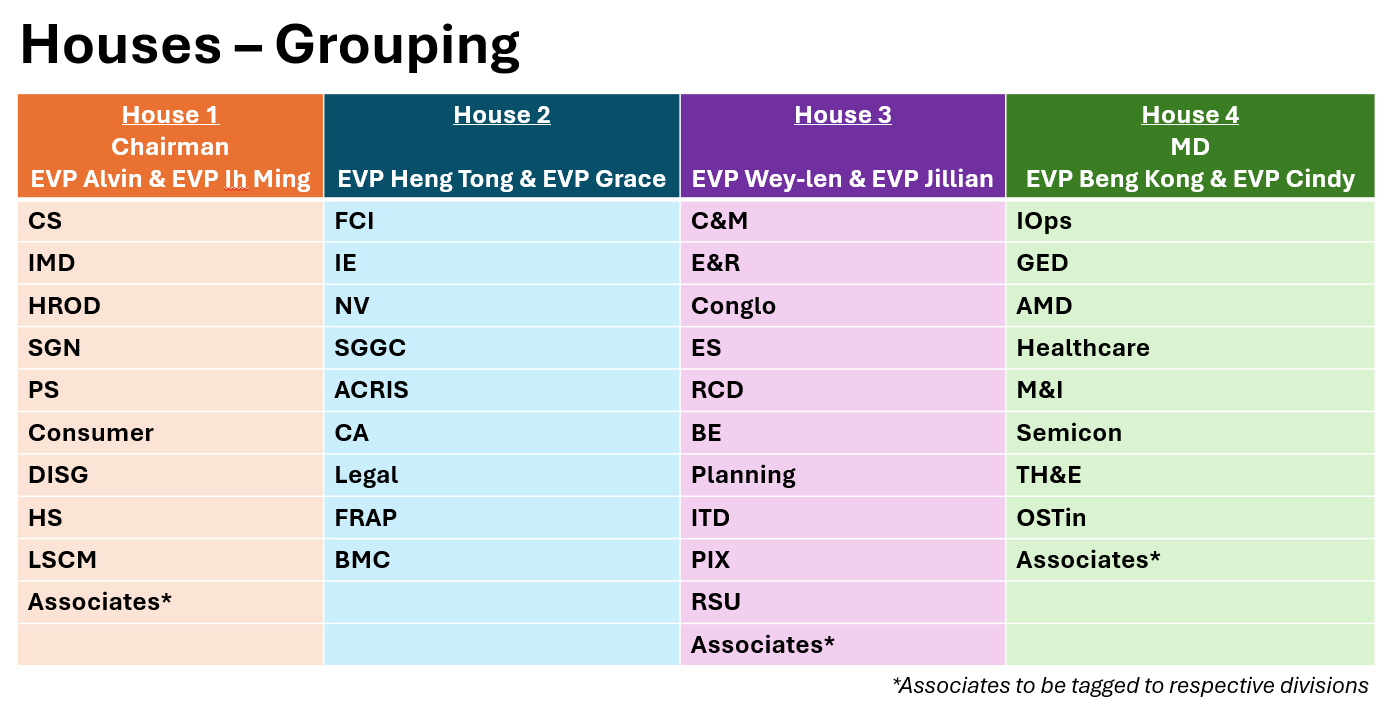
For the Run-Walk Challenge, House points will be determined by the total distance clocked by the entire House.
As a marquee event on the EDB sports calendar, the Run-Walk Challenge will carry double house points. Rally your teammates and make every step count!
| House Ranking | Awarded House Points |
|---|---|
| 1st | 20 |
| 2nd | 16 |
| 3rd | 10 |
| 4th | 4 |
Rewards
| Category | No. of Prizes | Prizes | Remarks |
|---|---|---|---|
| Team Prize | Top House | Vouchers 1. First Prize: $500 | Top team with highest distance clocked. |
| Individual Prizes | Top 3 Individuals | Vouchers 1. First Prize: $70 2. Second Prize: $50 3. Third Prize: $30 | Top 3 individuals with highest distance clocked. |
| Lucky Draw | 20 Winners | Vouchers 20 Prizes of $10 | Lucky Draw Framework
|
House Grouping
FAQs
How do I register my interest to participate in the challenge?
Submit your interest under the “Register” tab. Ensure that you fill in your full name and all required fields.
How do I track my runs/walks?
All runs/walks shall be tracked by a running app (e.g. MapMyRun, RunKeeper, Apple Watch Fitness, Garmin, Strava). Strava is strongly recommended.
How do I submit my run activities?
Submit all your results by 8 Dec 2025, 23:59H under the “Add Results” tab. Note that no late submission will be allowed.
What do I need to include in my run screenshots?
Take note that all run screenshots must have the following details:
- Distance ran
- Duration of the run/walk (HH:MM:SS)
If there are any missing details, your run result will not be recorded and tabulated towards the challenge.
What should I avoid to prevent my results from being marked as invalid?
Your results will be excluded if any of the following activities are suspected:
- Providing false data (including editing, sharing, fabricating, and manipulating screenshots)
- Tracking indoor activities (e.g., walking and tracking in an indoor compound for a sustained period of time)
- Randomly uploading photos (with no indication of distance and timing)
- Using other modes of travel (e.g., cycling)
What should I do if I encounter any technical issues (e.g. submission of screenshots)?
Contact helpdesk via Contact us and provide a description of your issue.
Where do I check my results?
Your results will be updated immediately on the leaderboard. However, in the event your results are invalid following verification, it will not be counted towards the final tabulation.